

Compliance Management Software Oil And Gas Regulators Won't Flag
The Core Operational Breakdown: Why Compliance Is a Cash Flow Issue
If you run a frac fleet in the Permian Delaware, a swab rig crew in the Bakken, or a vacuum truck operation in the Eagle Ford, you know the truth. Compliance management software oil and gas operations need is not a back-office luxury. It is the barrier between you and a six-figure fine or a lost contract with a major E&P operator.
Let me be blunt. The company man on location does not care about your paperwork. He cares about getting the well back on production. But when your driver shows up without the correct waste manifest, or your wireline ticket does not match the depth log, the company man stops caring about production. He starts caring about protecting his own lease. That is when you get flagged. That is when you get slow-paid. That is when you get removed from the approved vendor list.
The oilfield runs on paper that nobody trusts. You have the original ticket in the truck. You have a photo of the ticket on the dispatcher's phone. You have a scanned copy in the office. And you have the operator's version in their system. These four versions never match. When they do not match, the operator's AP department kicks the invoice out. That is a 45 day wait minimum. In the meantime, you are paying for diesel, crews, and triplex pump repairs out of your own pocket.
The operational breakdown is simple. You are losing money not because your crews are bad. You are losing money because your compliance trail is broken. The fix is not another spreadsheet. The fix is a system that captures the data at the source, in the field, and locks it down so nobody can argue about it later.
The 30 Day Revenue Leak: Consider a mid-sized well servicing company running 15 trucks. Average ticket value is $2,800. If 8 percent of your tickets get rejected due to compliance errors, that is $3,360 per day in disputed revenue. Multiply that by 22 working days. You are carrying $73,920 in receivables that are stuck in limbo. That is money you cannot use to pay for your next frac manifold inspection or your wireline unit's annual certification.
The Real Financial Drain: Show the Math on Non-Compliance
We talk about compliance management software oil and gas companies deploy as a cost center. That is a mistake. It is a revenue recovery tool. Let me show you the arithmetic that matters to your bottom line.
First, look at the cost of a single regulatory violation. If a pumper in the Haynesville fails to submit a proper brine disposal manifest and the state auditor catches it, the fine can range from $5,000 to $25,000 per incident. But the fine is only the beginning. The operator will likely issue a non-conformance report. That report goes into your vendor file. When the next master service agreement comes up for renewal, your pricing gets scrutinized. You lose the ability to raise rates. You might even get dropped.
Second, look at the cost of manual data entry errors. A dispatcher typing in a ticket number from a blurry photo makes a mistake one time in fifty. That seems small. But when you process 1,000 tickets a month, that is 20 errors. Each error requires a phone call, an email, a revised ticket, and a re-approval cycle. That process costs you 30 minutes of office staff time per error. At $35 per hour fully loaded, that is $17.50 per error. You are spending $350 a month just to fix typos. That is before you calculate the delay in payment.
Third, consider the DSO impact. Your days sales outstanding is probably sitting between 55 and 70 days. Every day you shave off that cycle puts cash back in your checking account. If your average monthly revenue is $800,000, reducing DSO by 10 days frees up $266,000 in working capital. That is not a rounding error. That is the difference between paying your vendors on time and getting put on COD by your supply store.
The math is clear. A robust compliance system pays for itself if it prevents just one moderate fine or accelerates payment on a handful of disputed tickets.
Why Generic Solutions and Spreadsheets Fail in the Field
I have seen operators try to manage compliance with a shared drive full of Excel files. It works for about three weeks. Then someone saves a file with the wrong name. Then a field supervisor updates his version on his laptop, but the office is looking at the server version. Then the auditor asks for the certificate of insurance from January, and nobody can find it because it is buried in an email from a driver who quit.
Generic project management tools do not work either. They are built for marketing teams and software developers. They do not understand a ticket lifecycle. They do not know what a PIDX standard is. They do not know that a ticket needs a signature from the operator's representative before the truck leaves the location. They do not know that a vacuum truck hauling produced water requires a different manifest than a frac tank hauling fresh water.
The oilfield has specific workflows. You have the company man on location. You have the dispatcher in the office. You have the AP clerk at the operator's headquarters. You have the state regulator who wants to see your records. Each of these people needs a different view of the same data. A spreadsheet cannot give them that. A generic tool cannot give them that.
The failure mode is always the same. Data is captured on paper in the field. It is transcribed into a computer later. The transcription introduces errors. The errors cause disputes. The disputes cause payment delays. The payment delays cause you to borrow money at 8 percent interest to make payroll. You are paying interest on mistakes that a digital system would have caught at the point of entry.
Step-by-Step Operational Framework for Field Compliance
Here is a framework that works. It is not complicated. It requires discipline and the right tool. This is the process that keeps you off the regulator's radar and out of the operator's dispute queue.
Step 1: Capture Data at the Source, Not the Office
The driver or field supervisor must enter the data on a mobile device while standing next to the iron. That means the ticket is created in the digital system before the truck leaves the pad. No more paper tickets in the glove box. No more photos of tickets sent via text message. The data is born digital. It includes the date, time, location, well name, operator, and the specific service performed.
This is where digital field ticketing becomes the foundation of your compliance program. If the ticket is correct at the source, everything downstream is easier.
Step 2: Enforce Mandatory Fields and Validations
The system must refuse to submit a ticket that is missing critical data. If the driver forgot to enter the truck number, the system flags it. If the ticket does not have a signature, the system holds it. You do not want to rely on a human to remember every field. You want the software to enforce the rules.
For example, if you are running a swab rig and the ticket requires a fluid volume measurement, the system should require a numeric value before allowing submission. If the volume is outside the expected range for that well, the system should prompt for a confirmation. This prevents the classic error of a pumper typing 1500 barrels when he meant 150. That one keystroke error can cause a massive dispute when the operator reconciles your ticket against their meter readings.
Step 3: Automate the Approval Workflow
Once the ticket is submitted, it must flow through an approval chain. The field supervisor reviews it. The office dispatcher reviews it. Then it goes to the operator through the proper channel, whether that is PIDX, OpenInvoice, or Cortex. The system should track every step. You should be able to see, at a glance, which tickets are stuck in approval and why.
This visibility is critical. If you know a ticket has been sitting with the operator's field foreman for three days, you can send a polite reminder. If you do not have visibility, you just wait and hope. Hope is not a strategy for cash flow.
Step 4: Maintain a Living Audit Trail
Every change to a ticket must be logged. Who edited it? When? What was the original value? What was the new value? This audit trail is your defense when a regulator asks questions. It is also your defense when an operator claims you overcharged for a service.
The audit trail must include document attachments. That means the signed copy of the ticket, the photo of the gauge reading, the weight ticket from the scale. All of it stored in one place, linked to the original transaction. When the auditor asks for supporting documentation, you do not scramble. You click a button and produce the entire file.
Step 5: Reconcile and Accelerate Billing
The final step is reconciliation. Your system should match your tickets against the operator's records. Discrepancies are flagged immediately. You resolve them before they become 60 day old disputes. This process is the key to accelerated oilfield billing. When your invoices are clean the first time, they get paid faster. It is that simple.
Permian Field Case Study: Exact Metrics from a Midland Basin Operator
Let me give you a concrete example. I worked with a well servicing contractor in the Midland Basin. They ran a fleet of 12 vacuum trucks and 4 frac water transfer pumps. They were supporting a large E&P operator who used Cortex for ticket approvals.
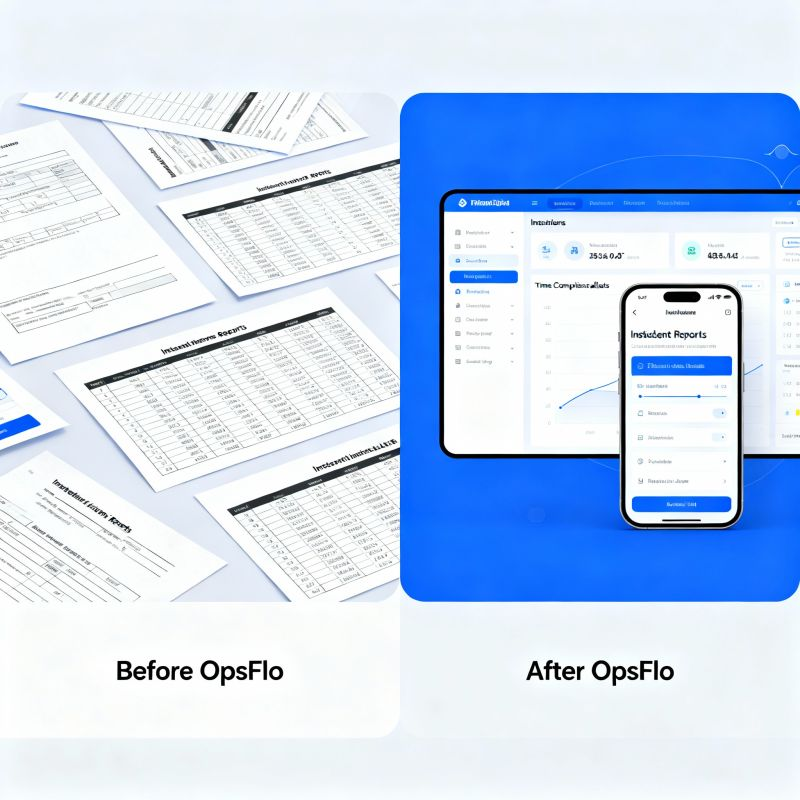
Before implementing a proper compliance system, their process was manual. Drivers filled out paper tickets. They handed them to the company man for signature. The company man often said, "Leave it with me, I will sign it later." That ticket would sit in the company man's truck for two or three days. Sometimes it got lost. Sometimes the ink smudged and the numbers were illegible.
The result was an average of 11 percent of their tickets being rejected or kicked back for clarification each month. Their DSO was 68 days. They were constantly calling the operator's AP department to chase down payments.
They switched to a mobile-first compliance management software oil and gas system designed for field operations. The change was immediate. Drivers entered data on rugged tablets. The system enforced mandatory fields. Tickets were submitted electronically to the company man for e-signature on the spot. The ticket went straight to Cortex through the integration.
The results after 90 days were measurable. Ticket rejection rate dropped from 11 percent to 1.5 percent. DSO dropped from 68 days to 51 days. That is a 17 day improvement. On their average monthly revenue of $620,000, that freed up over $350,000 in working capital. They stopped using their line of credit to make payroll.
The operator noticed the difference too. Their field foreman stopped getting calls from AP about bad tickets. The contractor moved up the preferred vendor list. They got first look at new work because the operator trusted their paperwork.
The Tare Weight Trap: One specific error that plagued this contractor was tare weight discrepancies at the disposal facility. The driver would write down the gross weight from the scale ticket, but the disposal facility would report a different tare weight for the truck. The difference of 500 pounds on a load of produced water at $0.15 per barrel created a dispute on every single load. The compliance system solved this by integrating with the scale house data and automatically calculating the net volume. Disputes on disposal tickets went to zero.
Implementation Checklist for Supervisors and Office Dispatch
Do not try to implement everything at once. You will fail. Follow this checklist in order. It will take you 30 days to get it right.
- Map your ticket types. List every service you provide. Frac water transfer, flowback, swabbing, wireline, vacuum truck hauling, hot oiling. Each one has different compliance requirements. Write them down.
- Define your mandatory fields. For each ticket type, decide what data is non-negotiable. Truck number, driver name, well name, operator, date, time on location, time off location, volumes, pressures, signatures.
- Configure your approval chain. Who approves what? Does the field supervisor approve all tickets before they go to the office? Does the office dispatcher do a final review? Make it clear.
- Train your field crews first. Run a pilot with your best crew. The one that never causes problems. Get their feedback. Adjust the workflow based on their input. They are the ones using it in the mud and the rain.
- Roll out to the rest of the fleet. Do not do a big bang launch. Go crew by crew. Provide a supervisor who can answer questions in real time for the first week.
- Set a 30 day review. Look at your rejection rate before and after. Look at your DSO. Look at the number of support calls you are getting from operators. The data will tell you if the system is working.
If you want to see the potential financial impact for your specific operation, use our ROI calculator. It takes five minutes and gives you a realistic number based on your ticket volume and current DSO.
Frequently Asked Questions
Will this replace my existing accounting software?
No. This is not an accounting system. It is an operational compliance system that sits between your field operations and your accounting software. It captures the field data, validates it, and then exports clean data to your accounting system. Your accountants still do what they do. They just do it with accurate data instead of garbage.
How long does it take for field crews to learn it?
If you have a crew that can operate a modern smartphone, they can learn this in one day. The interface is designed for a gloved hand on a rugged tablet. It is not a complicated enterprise system. It is a field tool. Most crews prefer it because they stop getting phone calls from the office asking them to redo paperwork.
What about operators who require specific portals like OpenInvoice?
The system is built to integrate with the major operator portals. If your customer requires submission through OpenInvoice or Cortex, the system formats the data correctly and submits it automatically. You do not have to manually re-enter data into the operator's portal. That is the single biggest time saver for your office staff.
Can we track certifications and insurance documents?
Yes. The compliance module tracks driver certifications, equipment inspection dates, and insurance certificates. You get alerts before a certification expires. This prevents the situation where a driver is sent to location but cannot work because his H2S certification lapsed last week. That is a wasted trip and a lost day of revenue.
Clear Executive Takeaway
The oilfield is a business of thin margins and thick paperwork. The operators who survive are the ones who get paid on time. The ones who get paid on time are the ones who submit clean, compliant, verifiable tickets every single time.
You cannot achieve that with paper. You cannot achieve that with spreadsheets. You cannot achieve that with a generic project management tool. You need a system built for the field, one that understands the difference between a frac ticket and a swab ticket, one that enforces the rules at the point of data entry, and one that gives you a complete audit trail when the regulator comes calling.
The cost of non-compliance is not just the fine. It is the disputed invoice, the slow payment, the lost contract, and the interest you pay on the line of credit you had to draw down because your receivables are stuck in limbo.
Stop treating compliance as a burden. Treat it as a competitive advantage. The contractor with the cleanest paperwork wins the work. It is that simple.
If you want to see how this works in your operation, look at the compliance management software oil and gas operators trust to protect their
No comments yet
Be the first to share your thoughts.
Leave a Reply
Comments are disabled on the shared-hosting build. If you want to respond to this article, email info@ops-flo.com and mention "Compliance Management Software Oil And Gas Regulators Won't Flag".
Contact OpsFlo