

Field Service Software Comparison Oil And Gas Operators Actually Need
Field Service Software Comparison Oil and Gas: The Operational Breakdown
Any field service software comparison oil and gas operators conduct today must start with one hard truth: your trucks, rigs, and crews are not the bottleneck. Your information flow is. A vacuum truck can pump off a tank battery in forty minutes. But the paper ticket from that job can take three days to reach the office, get keyed into QuickBooks, and be mailed to the operator. That delay is where your margin dies.
I have spent decades watching service companies in the Permian Delaware, the Midland Basin, and the Bakken bleed cash through slow paperwork. They buy new iron. They pay top dollar for experienced hands. Then they let a $12 per hour clerk with a spreadsheet decide when they get paid. This guide is not a list of software features. It is a field manual for choosing the system that actually gets your tickets approved and your invoices paid faster.
The Real Financial Drain No Vendor Will Show You
Let us do concrete arithmetic. Assume your oilfield service company grosses $2 million per month. Your average invoice value is $8,500. You run 235 tickets per month across wireline units, swab rigs, and frac water transfer pumps.
Your current cycle looks like this. Crew finishes job at 2:00 PM. Foreman writes a paper ticket in the cab of a pickup. Ticket sits on the dashboard until the crew returns to the yard, possibly 10:00 PM. Dispatcher collects tickets the next morning. Office admin enters them into the system by noon. Billing clerk prints and mails invoices by Thursday. The operator's accounts payable department receives it Monday. They have a 30 day payment term. You wait.
The average ticket-to-invoice cycle in this scenario is 6 days. If you are carrying $2 million in monthly revenue, that is roughly $400,000 in work that is completed but not yet billed at any given moment. That is your cash sitting in a filing cabinet.
The Cost of Paper Tickets
Monthly revenue: $2,000,000
Average invoice value: $8,500
Tickets per month: 235
Average billing delay: 6 days
Working capital trapped in un-billed work: ~$400,000
Annual cost of that capital at 8% interest: $32,000
Plus 3% of invoices rejected for errors (tare weights, PO numbers, date typos): $60,000 per year
Total annual leak: $92,000
That $92,000 is not a rounding error. That is the difference between affording a new triplex mud pump and watching your competitor buy it. A proper field service software comparison oil and gas managers trust has to start with this number. If the software cannot demonstrably cut that delay in half, it is not worth your time.
Why Spreadsheets and Generic Field Service Software Fail at the Wellhead
Generic field service software is built for HVAC technicians and cable installers. Those jobs have fixed price lists and simple arrival times. Your world is different. You deal with a frac manifold that has 12 different pressure ratings. You deal with a pumper who changes the destination tank battery halfway through the job. You deal with a company man who verbally approves an extra hour of rig time but refuses to sign a change order until the morning.
Spreadsheets fail for a simpler reason. They rely on manual data entry. Every time a human retypes a number from a paper ticket into a cell, there is a chance for error. A single transposed digit on a tare weight can mean you bill for 42,000 gallons of produced water instead of 24,000 gallons. The operator's back office catches it, rejects the ticket, and your payment cycle restarts from zero.
The deeper problem is visibility. When a dispatcher in Midland has to call a foreman in the Delaware Basin to ask if the wireline job is done, that is wasted time. When the office manager has to chase down three different supervisors to figure out which tickets are missing, that is wasted time. When you cannot tell the operator's AP department why invoice 4472 is missing a signature, that is wasted time. And wasted time in this business is not neutral. It is negative. It costs you the goodwill of the operator and the attention of your best people.
The Field Service Software Comparison Oil and Gas Operators Should Use
When you evaluate software, you are not buying a database. You are buying a faster path to approved invoices. There are four categories of tools on the market. Each has a place, but only one solves the core problem.
Category One: Pure Dispatch and GPS Tracking
These systems show you a map of your trucks. They tell you where your swab rig is parked at 3:00 AM. They are excellent for logistics. They do nothing for your billing. You still have to print the ticket, scan it, and email it to the operator. The ticket approval cycle remains unchanged. If you already have GPS tracking, do not replace it. Just understand it is only a piece of the puzzle.
Category Two: Generic Field Service Management
These are the big names you see advertised on podcasts. They handle scheduling, customer records, and basic invoicing. They are built for plumbers and electricians. They do not understand PIDX standards. They do not know what a pumper ticket looks like. They do not handle the specific line items required for a frac water transfer job. You can force them to work, but you will spend thousands of dollars on custom fields and integrations just to make a basic vacuum truck ticket look correct.
Category Three: Oil and Gas Accounting Suites
These tools are powerful on the back end. They handle revenue accounting, joint interest billing, and division orders. They are built for operators, not service companies. If you are a service company trying to use one of these, you will find the field operations module is an afterthought. Your foremen will hate the mobile app. Your dispatchers will hate the clunky interface. The accounting department will love it, but the field will rebel.
Category Four: Purpose-Built Oilfield Service Operations Platforms
This is the category that matters. A platform built specifically for oilfield service companies combines dispatch, digital field ticketing, and billing in one system. It speaks the language of the oilfield. It knows that a vacuum truck ticket has gross gallons, net gallons, and a destination facility. It knows that a wireline job has a depth log and a perforation interval. It knows that a frac job has pump times and sand concentrations.
The best of these platforms, like the one you can explore through the oilfield service operations platform modules, are designed to get the ticket from the crew's phone to the operator's inbox in minutes, not days. They integrate with OpenInvoice and Cortex for digital ticket routing. They eliminate the need for a human to rekey data. That is where the real financial gain lives.
A Step-by-Step Operational Framework for Choosing Software
Do not start with a software demo. Start with your own field process. Map out exactly what happens from the moment a crew finishes a job to the moment your bank account sees the money. Draw it on a whiteboard. Include every handoff. Every time a piece of paper changes hands, that is a point of failure.
Step one is to quantify your current delay. Look at your last 30 invoices. Note the date the job was completed and the date the invoice was sent. Average that gap. That is your baseline. If you do not know this number, you are flying blind.
Step two is to identify your rejection rate. How many invoices came back from operators with errors last month? What were the errors? Missing signatures, wrong PO numbers, incorrect pricing, bad dates. Each rejection costs you at least 10 days of payment delay and the administrative time to fix it.
Step three is to test the software against your worst case scenario. Do not demo a simple vacuum truck ticket. Demo a complex one. A job where the crew worked 14 hours, had a 2 hour weather delay, used 3 different disposal facilities, and had a last minute price change from the operator. If the software handles that smoothly, it will handle your routine work. If it struggles, move on.
Step four is to check the integration list. If you work with major E&P operators in the Permian or Eagle Ford, you need to know if the software connects to OpenInvoice and Cortex. These are the digital hubs that operators use to approve tickets. If the software cannot push your tickets directly into those systems, you are still in the email and PDF business. That is not good enough.
Permian Basin Case Study: The 48 Hour Ticket
Consider a real example from a pressure pumping company operating in the Midland Basin. They run 14 frac spreads and 30 sand haulers. Their old process was paper tickets for the sand haulers and manual entry for the frac data. The company man on location would sign a paper ticket at the end of each crew change. That ticket would sit in a box at the man camp until a driver headed back to the yard.
The average delay from job completion to ticket entry was 3.5 days. Their DSO was 54 days. They had two full time clerks just rekeying data and chasing down missing signatures.
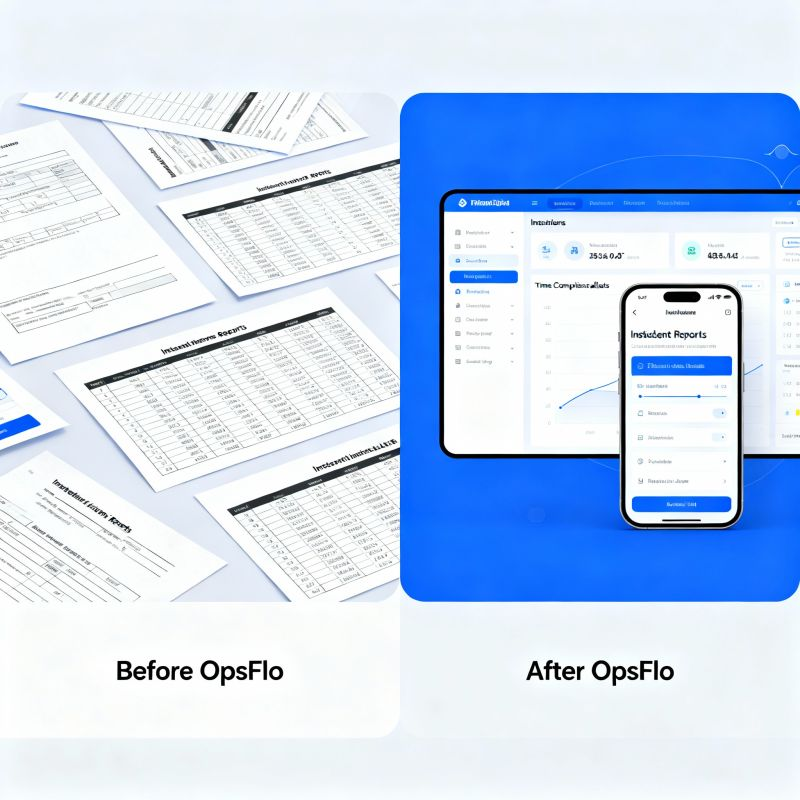
They switched to a digital system with digital field ticketing for the drivers. The driver now takes a photo of the load ticket, enters the gross and net weights on his phone, and hits submit. The ticket routes instantly to the operator's approval queue. The company man can approve it from his own phone while he is still on location.
The result was a reduction in ticket entry time from 3.5 days to 4 hours. Their DSO dropped from 54 days to 41 days. On a monthly revenue of $4.5 million, that 13 day improvement freed up nearly $2 million in working capital. They eliminated one of the two data entry clerk positions. The remaining clerk now spends her time on exceptions and collections instead of typing numbers.
That is the difference between software that tracks your trucks and software that accelerates your cash flow. The first is a cost center. The second is a profit center.
Implementation Checklist for Supervisors and Dispatchers
Rolling out new software in the oilfield is like introducing a new piece of iron. The crew will resist it until they see it make their lives easier. You cannot just hand out phones and expect adoption. You need a plan.
First, get the toolpushers and company men on your side. If the operator's representative refuses to approve digital tickets, your system will fail. Show him the digital ticket on your phone. Show him that his signature is legally binding and that he gets a copy instantly. Most company men prefer digital because they lose paper tickets constantly.
Second, start with one crew. Pick your best dispatcher and your most tech savvy foreman. Run 20 tickets through the new system. Find the glitches. Adjust your process. Then roll out to the next crew. Do not try to flip the whole company in one week.
Third, define your ticket completion rules. A ticket is not complete until it has the customer PO number, the correct job date, and all line item details. Build these as required fields in the software. If the foreman cannot submit the ticket without the PO number, you eliminate the number one cause of rejected invoices.
Fourth, set a daily cutoff time. All tickets from jobs completed before 5:00 PM must be submitted by 7:00 PM that same day. This creates a rhythm. The office knows that by 8:00 PM, they have a complete picture of the day's work. They can bill it first thing the next morning.
Fifth, measure your DSO weekly. Put the number on a whiteboard in the dispatch office. Show the crew how their speed affects the company's cash position. When they see that faster tickets mean more money for equipment maintenance and bonuses, they will buy in.
Frequently Asked Questions
Q: How long does implementation actually take?
A typical deployment for a service company with 50 to 200 field employees takes 2 to 4 weeks. The first week is configuration and integration setup. The second week is pilot testing with one crew. The third and fourth weeks are full rollout and training. If a vendor tells you it will take six months, they are selling you a custom build, not a software product. You want a product that is already built for your industry.
Q: What if my operators refuse to accept digital tickets?
This is less common than you think. Most major operators in the Permian, Haynesville, and Bakken already use OpenInvoice or Cortex for their own internal processes. They want digital tickets. The resistance usually comes from your own field supervisors who are comfortable with paper. The solution is to show them the digital ticket has the same legal standing and is easier to track. If a specific operator truly requires paper, you can still print the digital ticket and mail it. But you will find that most operators prefer the speed of digital.
Q: How does this integrate with my existing accounting software?
The best systems export directly to QuickBooks, Xero, and the major oil and gas ERP systems. The key is to look for a two way sync. When a ticket is approved, it should automatically create an invoice in your accounting system. When you receive a payment, it should mark the invoice as paid. This eliminates the double entry that causes so many errors.
Q: What is the real ROI timeline?
Most companies see a measurable reduction in DSO within the first 60 days. The initial impact comes from eliminating the paper handoff. The secondary impact comes from reducing invoice rejections. If you are currently losing 3% of your revenue to rejected invoices and delayed payments, fixing that alone pays for the software. To see your specific numbers, use an ROI calculator to model your own revenue and current DSO.
The Executive Takeaway
You are not in the business of tracking trucks. You are in the business of completing work and getting paid for it. Every day between job completion and invoice approval is a day your money is working for someone else.
The right field service software comparison oil and gas operators need to make is not about features. It is about the speed of cash. It is about the accuracy of your tickets. It is about whether your dispatcher can see the status of every job in real time without making a single phone call.
Stop measuring software by its user interface. Measure it by the number of days it shaves off your billing cycle. Measure it by the percentage of tickets that go through without a single rejection. Measure it by whether your foremen actually use it without being chased.
The operators you work for are getting faster at paying their bills. They are centralizing their AP departments and demanding digital submissions. If you cannot send them a clean, accurate, digital ticket, you will be at the back of the payment line. That is not a technology problem. That is a survival problem.
If you want to see what this looks like in practice, request a revenue diagnostic. They will walk through your current ticket cycle and show you exactly where the money is leaking. You can also explore how accelerated oilfield billing works for companies like yours. The numbers will speak for themselves.
The oilfield rewards speed. It rewards accuracy. And it rewards
No comments yet
Be the first to share your thoughts.
Leave a Reply
Comments are disabled on the shared-hosting build. If you want to respond to this article, email info@ops-flo.com and mention "Field Service Software Comparison Oil And Gas Operators Actually Need".
Contact OpsFlo