

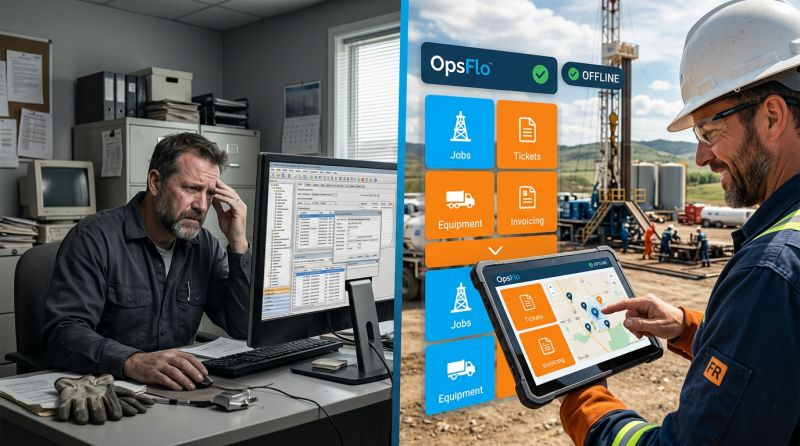
Offline Field Data Capture Software: Why Connectivity Should Never Be A Requirement
The hard truth: Your best pumper is standing on a well pad in the Delaware Basin with zero bars. The company man is yelling for a ticket. Your dispatcher is waiting on the data to bill the client. If your software requires Wi-Fi, you have already lost the day.
The Core Operational Breakdown: Why Connectivity Is A Myth
The oilfield is a hostile environment for data. You know this better than anyone. You have driven the back roads of the Permian, the gravel leases of the Bakken, and the pine thickets of the Eagle Ford. Cell coverage is a rumor. It dies in the draws, behind the tank batteries, and in the shadow of the frac manifold.
Yet most software vendors sell you a fantasy. They show you a dashboard in a Houston boardroom with perfect internet. They never show you the reality of a swab rig operator at 2:00 AM trying to upload a tour sheet from a cab with a cracked windshield and a dying phone battery.
Offline field data capture software solves this specific problem. It is built for the reality that your crews operate in dead zones. The software stores every piece of data locally on the device. It syncs automatically when the signal returns. No manual re-entry. No lost tickets. No arguments about what happened on the pad.
Consider the anatomy of a typical failure. A wireline unit finishes a perforating job in the Haynesville. The engineer fills out a paper ticket. He drives 45 minutes to the nearest cell tower to send a photo to the office. The photo is blurry. The office re-types the data into the billing system. There are three errors in the depths and one error in the pump time. The client disputes the invoice. You wait 60 days for payment instead of 15.
That chain of failure is optional. Offline field data capture software eliminates the middle steps. The ticket is created digitally at the wellhead. It is validated against the job plan. It syncs when the truck hits the highway. The invoice is ready before the crew reaches the next location.
The Real Financial Drain: Show The Math
Let us talk about money. Not theoretical savings. Real dollars that leak out of your business every single month.
Start with the ticket cycle. Industry data suggests the average oilfield service company takes 45 to 60 days to get paid. The clock starts when the client receives a correct, approved invoice. If your ticket is wrong, the client rejects it. The clock resets. You are now financing the oil company's operations with your cash flow.
Run the arithmetic on a mid-sized frac company. You run 100 tickets per month. The average ticket value is $25,000. That is $2.5 million in monthly revenue. If you accelerate payment by just 10 days through faster, accurate data capture, you reduce your working capital requirement by roughly $800,000. That is cash you do not have to borrow. At 7% interest, you save $56,000 per year just on the interest.
Now factor in the cost of rework. Every rejected ticket costs you administrative time. Your office staff spends 20 minutes on the phone with the client's accounts payable department. They argue about a signature. They argue about a pump rate. They argue about a date. At $35 per hour fully loaded, that is $12 per dispute. Multiply that by 15% of your tickets being rejected, and you are bleeding money on pure friction.
The bigger cost is NPT, non-productive time. When a pumper cannot get a ticket approved because the data is locked on a phone that will not upload, the next job waits. A frac spread costs $300,000 to $500,000 per day to run. If you lose 30 minutes waiting on paperwork, that is $6,000 to $10,000 of iron sitting idle. Offline field data capture software prevents this by making sure the data is already in the system before the iron moves.
The arithmetic of lost tickets: A vacuum truck operator in the Midland Basin runs 12 loads per day. Each load is $850. He forgets to submit one ticket per week because the app times out in a dead zone. That is $850 per week, $3,400 per month, $40,800 per year in pure lost revenue. Offline capture eliminates this risk entirely.
Why Generic Solutions And Spreadsheets Fail In The Field
You have tried the generic tools. You have a shared Google Sheet for dispatch. You have a group chat for ticket approvals. You have a scanner app on your phone. None of these work at scale.
Spreadsheets are dangerous. They have no validation. A pumper types "12,000" when he means "12,00" for a depth. The decimal point is missing. The client catches it. The ticket is rejected. The spreadsheet also has no audit trail. You cannot prove who entered the data or when. In a dispute with a major operator, that is a losing position.
Generic field service apps are worse. They are built for plumbers and HVAC technicians. They do not understand a triplex mud pump or a frac manifold. They do not know what a company man needs to see on a ticket. They do not handle the complexity of multiple service lines on one job, or the split billing between the operator and the working interest owners.
The offline requirement is the dealbreaker. Most generic apps require a live connection to function. They cache data temporarily, but if the connection drops mid-entry, the data is lost. Your crew is back to writing on paper. Paper gets lost. Paper gets wet. Paper gets left on the dash of a truck that is towed to the yard.
Offline field data capture software is different. It treats the local device as the source of truth. The data lives on the phone or tablet until it can be transmitted. This is not a convenience feature. It is the core architecture of the system. It is the difference between a tool that works on paper and a tool that works in the oilfield.
Step-By-Step Operational Framework: How To Deploy This Correctly
Implementing offline field data capture software is not a software project. It is an operational change. You must manage it like you manage a rig move. Here is the framework that works.
Step 1: Map Your Data Flow From Pad To Payment
Sit down with your dispatchers and your billing staff. Draw the current process on a whiteboard. Where does the data originate? Usually it is a hand-written note on a pumper's clipboard. Where does it go next? It gets transcribed into a spreadsheet or an ERP system. Where does it get approved? It goes to the company man or the operator's field representative. Where does it become an invoice? In the back office.
Every handoff is a point of failure. Every transcription is a chance for error. Every delay is a day added to your DSO. Your goal is to eliminate the handoffs. The field data capture tool should be the single point of entry. From there, it flows automatically to the approval queue and then to billing.
Step 2: Standardize The Ticket Template
Your clients have specific requirements. Some want PIDX XML formats. Some use OpenInvoice. Some use Cortex. Your offline field data capture software must be flexible enough to generate the right format for each client. Do not accept a tool that forces you into a one-size-fits-all template.
Define the mandatory fields for each job type. A frac job needs pump rates, sand concentrations, and fluid volumes. A swab job needs run numbers and fluid recovery. A wireline job needs depths and shooting intervals. The software should enforce these fields. If the pumper tries to submit without critical data, the system should flag it immediately, not after the client rejects it.
Step 3: Train The Crew On The Device, Not The Theory
Your toolpushers and pumpers do not care about software architecture. They care about getting back to the man camp for dinner. The training must be practical. Show them how to open the app, select the job, and enter the numbers. Show them what happens when they hit "save." The data is safe. It will sync later. They do not need to worry about the cloud.
Set the expectation that the digital ticket is the only ticket. Do not accept paper backups. If the crew knows they can fall back on paper, they will. You must make the digital process the path of least resistance. If it is faster and easier than paper, they will adopt it.
Step 4: Establish The Sync And Reconciliation Routine
Offline capture does not mean you never check the connection. It means you check it on your schedule, not the cell tower's schedule. Establish a routine. When the crew returns to the yard or hits a known coverage area, the app syncs automatically. Your dispatcher should have a dashboard showing which jobs have synced and which are still pending on devices.
At the end of each day, reconcile the field data against the dispatch log. If a job is missing, call the crew immediately. Do not wait three days to discover a lost ticket. The offline software gives you the tools to track this. Use them.
Permian Field Case Study: Exact Metrics From A Real Deployment
Consider a case study from a production services company operating in the Permian Delaware Basin. This company runs 14 swab rigs and 6 vacuum trucks. They service 80 wells per month for three different operators. Before implementing offline field data capture software, they operated entirely on paper tickets.
The baseline was painful. Their average DSO was 58 days. They had a 12% ticket rejection rate due to missing signatures or incorrect well numbers. They employed two full-time billing clerks just to chase down discrepancies. The field crews spent an average of 45 minutes per day on paperwork, usually at the end of a 12-hour shift when they were exhausted.
The deployment took three weeks. They rolled out the software to all 20 vehicles. They used ruggedized tablets mounted in the cabs. The training was two hours per crew, conducted at the yard during the morning safety meeting.
The results after 90 days were measurable. Ticket rejection rate dropped from 12% to 1.5%. The remaining rejections were due to client-side errors, not field data errors. DSO dropped from 58 days to 41 days. That is a 17-day improvement. On an average monthly revenue of $1.2 million, that freed up approximately $680,000 in working capital.
The field crews reported saving 30 minutes per day on paperwork. That is 30 minutes they spent driving to the next location or performing preventive maintenance on the equipment. The billing clerks were reassigned to more valuable work, such as negotiating early payment discounts with clients.
The company also saw a reduction in disputes. Because the data was captured digitally at the source, there was an immutable audit trail. When an operator claimed a pump rate was different than billed, the company could pull the exact timestamped entry from the field device. The dispute was resolved in minutes, not weeks.
The bottom line: 17 days of DSO reduction on $1.2 million monthly revenue is worth roughly $680,000 in cash. At a 10% cost of capital, that is $68,000 per year in avoided interest. Add the elimination of rework and the productivity gain from the crews, and the annual value exceeds $150,000. That is not a software expense. That is a profit center.
Implementation Checklist For Supervisors And Office Dispatch
You need a practical checklist. Print this out. Put it on the wall of the dispatch office.
- Device audit: Verify every field device has the latest version of the app installed. Check storage capacity. A full memory card will cause sync failures.
- Template validation: Confirm the ticket templates match the current contract terms with each operator. If the contract changed, update the template before the next job.
- Offline drill: Put a device in airplane mode. Enter a complete test ticket. Confirm it saves locally. Then turn off airplane mode and confirm it syncs. Do this weekly.
- Sync dashboard review: Every morning at 7:00 AM, review the sync dashboard. Identify any jobs from the previous day that have not synced. Contact the crew immediately.
- Approval workflow test: Submit a test ticket through the approval chain. Confirm the company man can approve it from his phone or tablet. Confirm the approval notification reaches the billing team.
- Billing integration check: Confirm the approved ticket flows directly into your invoicing system. If you use OpenInvoice or Cortex, verify the format is accepted.
- Battery management: Provide charging cables for the vehicles. A dead tablet is no better than a lost paper ticket. Enforce a charging routine.
- Fallback protocol: Define what happens if a device is lost or broken. The data should be recoverable from the cloud once synced. If it never synced, you have a problem. Have a spare device in the dispatch office ready to deploy.
Your dispatchers are the key to success. They must own the reconciliation process. Give them the authority to hold a crew accountable for missing data. Give them the tools to see the status of every job in real time. This is their new operating system.
Frequently Asked Questions
What happens if the device is destroyed before the data syncs?
This is the risk you must manage. The offline field data capture software stores data locally. If the device is physically destroyed before a sync, the data is lost. However, most modern devices have local encryption and auto-backup features that can sync partial data when the device is next powered on. The practical mitigation is to require crews to sync at every known coverage point, not just at the end of the shift. This limits the potential data loss to a single job, not a full day of work.
Will the company man accept a digital signature?
Yes, if you do it correctly. The major operators are already moving toward digital approvals. The company man is often the bottleneck because he is busy. The key is to make the approval process easy for him. Send him a link via text or email. He taps to review and signs with his finger. It takes 30 seconds. If he prefers a stylus, provide one. The audit trail is actually stronger than a wet signature because it includes a timestamp and GPS location.
How does this integrate with my existing accounting software?
The best offline field data capture software offers API integrations with common oilfield ERP systems. If you use a system like OpsFlows, the integration is native. If you use a generic accounting package, you may need to export and import data. The critical factor is the format. For oilfield services, you need to support PIDX and the specific requirements of OpenInvoice and Cortex. Ask your vendor for a list of supported integrations before you commit.
Is this only for large companies with dedicated IT staff?
No. Offline field data capture software is often easier to deploy for a small company because you have fewer devices and fewer legacy systems to integrate. A company with 5 trucks can be live in a week. The software is typically sold as a subscription per user per month. The ROI calculation is the same regardless of size. A small company with $200,000 in monthly revenue and a 12% rejection rate is losing $24,000 per month to rework. The software pays for itself in the first week.
Clear Executive Takeaway
Connectivity is a convenience, not a requirement. The oilfield does not run on a reliable internet connection. It runs on diesel, hydraulic pressure, and the judgment of your field crews. Your data systems must match that reality.
Offline field data capture software is not a luxury feature. It is the only architecture that works when the cell signal dies at the bottom of a draw in the Midland Basin. It is the difference
To see how your team can eliminate this operational drag, explore the Offline Field Data Capture Software: Why Connectivity Should Never Be A Requirement solution on OpsFlo or schedule a diagnostic session with our operations engineering team.
No comments yet
Be the first to share your thoughts.
Leave a Reply
Comments are disabled on the shared-hosting build. If you want to respond to this article, email info@ops-flo.com and mention "Offline Field Data Capture Software: Why Connectivity Should Never Be A Requirement".
Contact OpsFlo