


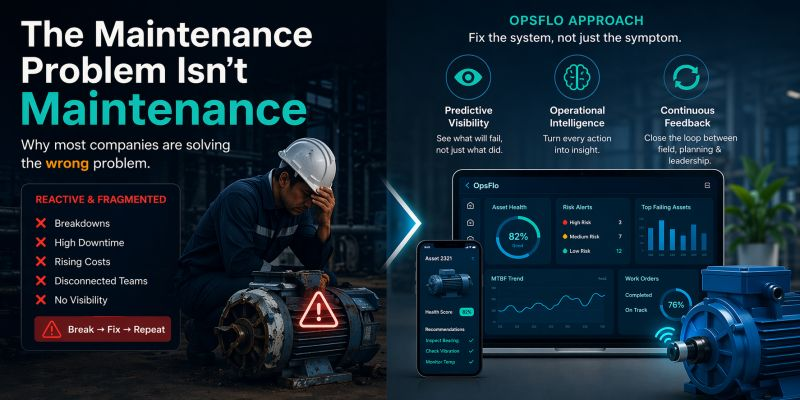
Oil And Gas ERP Alternative: Why Generic ERPs Break In The Field
The Core Operational Breakdown
If you are running an oilfield service company and forcing a generic ERP to manage your daily operations, you already know the pain. The invoice is wrong. The ticket is missing a signature. The company man is disputing the water haul. You are not alone. The market is finally recognizing that a true oil and gas ERP alternative is not just a software preference. It is a survival mechanism for margins in the Permian Delaware, the Midland Basin, the Bakken, and the Eagle Ford.
A generic ERP like NetSuite, SAP, or Microsoft Dynamics is built for manufacturing widgets or moving inventory through a warehouse. It is not built for the chaos of a wellsite at 2:00 AM when a triplex mud pump fails, the toolpusher needs a replacement part, and the wireline unit is waiting on location. The operational reality of oil and gas is non-linear. Your revenue cycle depends on field data collection, not purchase orders.
We need to talk about the actual breakdown. Not the theoretical one. The one where your dispatcher spends four hours on the phone reconciling a ticket because the pumper wrote the wrong API gravity. The one where your accounts receivable team is chasing a $180,000 invoice that has been sitting in Cortex or OpenInvoice for 60 days because the backup documentation does not match the service level agreement.
This guide is for the operations executive who is tired of being the IT department's beta tester. It is for the field supervisor who needs to know exactly what equipment is on location and when it is coming back. It is for the owner who wants to see the true cost of a job before the invoice goes out, not after the variance report comes back from the accountant. Let us get into the mechanics of why generic systems fail and what you should demand instead.
The Real Financial Drain: Show The Math
Let us put hard numbers on the table. The average oilfield service company loses between 3% and 7% of its gross revenue to billing leakage and revenue write-offs. That is not a guess. That is the arithmetic of manual ticket entry, rate card mismatches, and unsigned tickets that get disputed by the operator.
Consider a mid-sized pressure pumping company running $50 million in annual revenue. If they are using a generic ERP and manual field ticketing, they are likely losing 5% of that to leakage. That is $2.5 million gone. Not because the work was bad. Because the paperwork was wrong.
The Cost of Manual Reconciliation
- Average time to reconcile one field ticket manually: 18 minutes
- Tickets per month for a 15-rig frac crew operation: 1,200
- Monthly hours lost to reconciliation: 360 hours
- Cost at $45/hour loaded burden rate: $16,200 per month
- Annual cost of just fixing tickets: $194,400
That is before you calculate the DSO impact. If you reduce your Days Sales Outstanding from 55 days to 35 days on $50 million revenue, you free up $2.7 million in working capital.
The financial drain is not just in the back office. It is in the field. When a vacuum truck driver shows up to a location and the dispatcher has the wrong well pad coordinates, that driver burns an hour of drive time. At $150 per hour for the truck and driver, that is a $150 mistake. Multiply that by 50 trucks and you have $7,500 lost every day to poor dispatch data. A generic ERP cannot fix that because it does not know what a well pad is.
The industry is moving toward digital field ticketing and automated invoice matching. If you are still using a generic ERP with a bolt-on field service module, you are paying for two systems that do not talk to each other. You are paying for integration consultants who have never been on a rig in their lives. You are paying for the gap between the field and the office.
Why Generic Solutions and Spreadsheets Fail in the Field
A generic ERP is designed around the concept of a fixed bill of materials and a predictable production schedule. Oilfield operations are the opposite of predictable. You have weather delays in the Haynesville. You have crew changes in the Bakken. You have a company man who decides mid-job that he wants a different sand mesh size, which changes the entire frac manifold configuration.
The first failure point is the master data. In a generic ERP, you have a customer master, an item master, and a price list. In the oilfield, you have a rate card that changes based on the basin, the depth of the well, the type of equipment, and the specific operator's contract terms. A generic ERP cannot handle the complexity of a rate card that says "triplex pump rental at $850 per hour with a 4-hour minimum, but $1,100 per hour if the well is deeper than 15,000 feet in the Midland Basin."
The second failure point is the ticket itself. A generic ERP has a service entry sheet. It does not understand that a digital field ticket needs to capture the pumper's name, the lease number, the API well number, the start and stop times, the equipment ID, the fluid volumes, the pressure readings, and the signature of the operator's representative. When you force a generic ERP to do this, you end up with a workaround. Someone in the field takes a photo of a paper ticket and emails it to the office. Then someone in the office retypes it into the ERP. That is where the errors happen.
The third failure point is the approval workflow. In the oilfield, you have PIDX standards, OpenInvoice, and Cortex. These are not just portals. They are compliance gatekeepers. If your invoice does not match the approved ticket in the operator's system, it gets rejected. A generic ERP sends a flat file or a PDF. It does not structure the data to meet the operator's specific validation rules. You end up with a 45-day payment cycle that turns into a 75-day payment cycle because of rejections.
You need an oil and gas ERP alternative that is built for the ticket-to-cash workflow, not one that requires you to build a custom integration layer that breaks every time the software vendor pushes an update.
Step-by-Step Operational Framework
Let us walk through the framework that works in the field. This is not theoretical. This is the sequence of events that happens on a successful job, and where the data needs to flow.
Step 1: Dispatch and Job Scheduling
The job starts in the office, but it is won or lost in the field. The dispatcher needs to see real-time availability of assets. Is the swab rig still on the previous well? Is the wireline unit coming back from a plug and perf job in the Eagle Ford? A generic ERP does not track asset location in real time. It tracks inventory in a warehouse. You need a system that shows you the asset, its current job, its estimated time of completion, and its next assignment.
Step 2: Field Data Capture
When the crew arrives on location, they need to capture data at the source. This is not about typing into a laptop. It is about mobile-first data entry that works even when the Wi-Fi is dead in the middle of the Permian. The field supervisor needs to log the arrival time, the equipment setup, the job start, the job end, and any downtime events. Downtime is critical because it drives NPT (Non-Productive Time) calculations. If the frac pump goes down for 2 hours, that is billable or not, depending on the contract. The system needs to capture that event in real time.
Step 3: Automated Ticket Generation
The ticket should be generated automatically from the field data. No retyping. No spreadsheets. The system takes the start time, the end time, the equipment used, the rate card, and the contract terms, and it produces a ticket that matches what the company man expects to see. This is where a true oil and gas ERP alternative shines. It does not ask you to configure a generic service module. It already knows that a frac job has stages, pump rates, and sand volumes.
Step 4: Approval and Billing
Once the ticket is signed electronically in the field, it flows to the office for review. The system checks for rate card compliance, contract compliance, and missing data. It then formats the invoice for the operator's specific portal, whether that is OpenInvoice, Cortex, or a direct submission. This is where you eliminate the 18-minute manual reconciliation per ticket. The system does the check in milliseconds.
If you want to see the specific financial impact on your operation, use the ROI calculator to model your current ticket volume and DSO against the automated workflow.
Permian Field Case Study With Exact Metrics
Let us look at a real scenario from the Delaware Basin. A mid-sized well servicing company runs 12 swab rigs and 4 vacuum trucks. They operate in Reeves County and Ward County, Texas. They were running on a generic ERP with a manual paper ticket process.
The problem was simple. The paper tickets were getting lost between the field and the office. The company man would sign the ticket, but the handwriting was illegible, or the pumper forgot to write the pump hours. The office staff was spending 3 hours every morning just calling the field crews to clarify what happened the day before.
They switched to a purpose-built oilfield operations platform. The results were measurable within the first 60 days.
Delaware Basin Results: 60-Day Window
- Ticket reconciliation time: Reduced from 18 minutes to 4 minutes per ticket
- Ticket errors: Reduced from 12% to 1.8%
- Invoice rejections from operator portals: Reduced from 8 per month to 1 per month
- DSO: Reduced from 52 days to 38 days
- Monthly billing volume: Increased by $140,000 because previously unbilled work was now captured
The increase in billing volume came from capturing standby time and demurrage that was previously missed on paper tickets.
The key metric was the reduction in invoice rejections. Every rejection costs money. Not just in rework, but in the delay of the payment cycle. When an invoice is rejected in Cortex, it goes to the back of the queue. A 30-day payment becomes a 60-day payment. For a company running $8 million in monthly revenue, that is a significant cash flow hit.
The transition was not about training people on a new ERP. It was about giving the field crews a tool that was easier to use than a paper ticket. The field adoption rate was 100% within two weeks because the mobile app was faster than writing by hand.
Implementation Checklist for Supervisors and Office Dispatch
If you are ready to move off the generic ERP and onto a platform that understands oilfield operations, here is the implementation checklist. This is the order of operations that prevents chaos during the transition.
Phase 1: Data Cleanup and Rate Card Validation
Before you go live, you must clean up your master data. Pull every active rate card and validate it against the signed contracts. You will find discrepancies. That is normal. Fix them in the new system before you migrate. If you migrate bad data, you will have bad tickets on day one.
Phase 2: Field Pilot With One Crew
Do not roll out to all crews at once. Pick one crew in one basin that has a cooperative supervisor. Run them on the new system for two weeks. Get their feedback on the mobile app. Adjust the fields they need to capture. Make sure the ticket format matches what the operator expects to see.
Phase 3: Office Workflow Configuration
In parallel with the field pilot, configure the office workflow. Set up the approval hierarchy. Determine who reviews the tickets before they go to billing. Set up the integration with your accounting system for the general ledger posting. This is the step where you implement digital field ticketing to replace the paper trail.
Phase 4: Full Rollout and Training
Once the pilot is clean and the office workflow is tested, roll out to the rest of the operation. Train the dispatchers first, then the field supervisors, then the crews. Keep the training short. Focus on the three things they do most: start a job, end a job, and capture downtime.
Phase 5: Monitor and Optimize
After 30 days, review the data. Look at the ticket error rate. Look at the time from job completion to invoice submission. Look at the DSO. You should see improvements in all three areas. If you do not, there is a process issue that needs to be addressed. The software is not the problem. The process is.
Frequently Asked Questions
Can we keep our current accounting software and just replace the field operations module?
Yes. A true oil and gas ERP alternative does not require you to rip out your general ledger or your payroll system. It integrates with QuickBooks, Sage, NetSuite, and other back-office systems. The goal is to get the field data right and then push clean data into your accounting system. You keep the back office you have. You replace the broken front end.
How long does it take to get a crew trained on the mobile app?
Most field crews are proficient within two days. The app is designed for a pumper or a toolpusher who is wearing gloves and standing next to a running engine. It is not a complex ERP interface. It is a simple form that asks for the job number, the start time, and the end time. If your crew is not adopting it after one week, the problem is usually that the office is still asking them for duplicate data. Eliminate the duplicate entry and adoption will follow.
What happens when we hit a bad weather day and no one is on location?
The system handles this with a status change. The dispatcher marks the job as weather delayed. The ticket is not generated because no work was performed. But the standby time is captured, which is billable under most contracts. This is a critical feature that generic ERPs miss. They do not understand the difference between a job that is complete and a job that is paused for weather.
How does this handle the operator portals like OpenInvoice and Cortex?
The platform formats the invoice data to match the specific requirements of each portal. It does not send a generic PDF. It sends structured data that passes the validation rules on the first submission. This is how you get to accelerated oilfield billing and reduce your DSO by 15 to 20 days.
Clear Executive Takeaway
The generic ERP was never designed for the oilfield. It was designed for a factory floor where the product moves in a straight line. Your operation is a web of moving parts, changing conditions, and high-stakes decisions. The cost of forcing a square peg into a round hole is measured in lost revenue, disputed tickets, and cash flow delays.
The math is clear. A 5% reduction in billing leakage on a $50 million operation puts $2.5 million back on the bottom line. A 15-day reduction in DSO frees up working capital that you can use to buy equipment or pay down debt. The technology exists today. It is not experimental. It is running in the Permian, the Bakken, and the Eagle Ford right now.
Stop paying your IT team to build workarounds for a system that does not understand your business. Stop accepting that 12% of your tickets have errors. Stop waiting 55 days for payment on work you completed in 3 days.
The oil and gas ERP alternative is not a compromise. It is the correct tool for the job. If you want to see what this looks like for your specific operation, request a revenue diagnostic and get a clear picture of where your leakage
No comments yet
Be the first to share your thoughts.
Leave a Reply
Comments are disabled on the shared-hosting build. If you want to respond to this article, email info@ops-flo.com and mention "Oil And Gas ERP Alternative: Why Generic ERPs Break In The Field".
Contact OpsFlo