

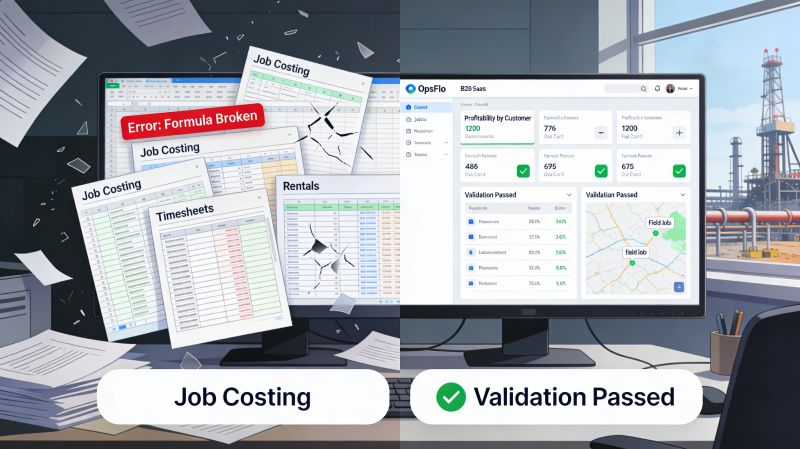
Software For Wellsite Service Providers Working 240 Sites At Once
The problem is not the work. It is the paperwork around the work.
You run 240 active well sites across the Permian Delaware and Midland basins. You have 47 service crews, 12 dispatchers, and 3 billing clerks who are drowning in paper tickets. Your revenue is real. Your cash flow is a guess. Your field tickets are a mess.
This guide is for the operations executive who needs software for wellsite service providers that actually works in the dust, the rain, and the 2 AM breakdowns. Not a demo. Not a dashboard. A system that gets your invoices out the door in 3 days instead of 30.
The Core Operational Breakdown: Why 240 Sites Breaks Your Back Office
Let me describe your Tuesday. You have 240 sites running. That means 240 locations where work is being performed, equipment is being moved, and fluids are being pumped. Each site generates a ticket. Each ticket has line items. Each line item has a unit of measure, a rate, and an approval signature.
The company man on location signs the ticket. That signature is your proof of work. Without it, you do not get paid. With it, you still might not get paid for 60 days because the ticket sits in a truck, then in a dispatch office, then in a billing clerk's inbox, then in the operator's AP system.
Multiply that by 240 sites and you are not running an oilfield services company. You are running a paper logistics company that happens to pump frac fluid and run wireline units.
The field operation is the easy part. Your toolpushers know how to run a triplex mud pump. Your wireline crews know how to rig up and shoot perforations. Your vacuum truck drivers know the lease roads better than Google Maps. The breakdown happens when that field reality must be translated into a clean, billable, approvable invoice.
The Real Financial Drain: Show Me The Math
Let me show you what 240 sites does to your working capital when you rely on paper tickets and manual data entry.
Assume your average ticket value is $8,500. That is modest for a frac spread or a deep well service job in the Haynesville. At 240 sites, you generate roughly 480 tickets per week if each site works two jobs. That is $4.08 million in weekly revenue.
Now look at your Days Sales Outstanding. The industry average for wellsite service providers is 55 to 70 days. The best operators using modern software get that down to 25 days. That is a 35 day difference.
The Cost of Slow Billing
Weekly revenue: $4.08 million. Annual revenue: $212 million. If your DSO is 60 days, you are carrying $35.4 million in uncollected receivables. If you cut DSO to 25 days, you carry $14.8 million. That is $20.6 million of your own cash sitting in your bank account instead of the operator's.
At a 10% cost of capital, that delay costs you $2.06 million per year. That is not a rounding error. That is the difference between buying new iron and leasing it.
There is also the ticket rejection problem. In the Eagle Ford and Bakken, operators reject 8 to 12% of manually submitted tickets on the first pass. Common reasons: missing signature, wrong AFE number, incorrect unit of measure, or a date mismatch. Each rejection costs you 2 to 3 hours of back office time to research, correct, and resubmit. At 480 tickets per week, a 10% rejection rate is 48 rejections. At 2.5 hours each, that is 120 hours of wasted labor per week. That is three full time employees doing nothing but fixing mistakes.
Why Spreadsheets and Generic Software Fail in the Field
I have walked into dozens of service company offices in Midland and Odessa. I have seen the Excel workbooks with 14 tabs. I have seen the QuickBooks workarounds. I have seen the "we will just text a photo of the ticket to the billing clerk" system.
These systems fail for one reason: they are not built for the reality of a wellsite. A spreadsheet does not care if your wireline truck lost cell signal in a remote Delaware Basin location. A generic CRM does not understand that a "job" has a rig-up time, a pump time, and a rig-down time, each billed at different rates. A photo of a ticket is not data. It is a picture of data that a human must transcribe.
The failure modes are predictable. First, data entry errors. A clerk types 8,500 when the ticket says 85.00. That is a $7,500 mistake that takes 40 days to discover. Second, lost tickets. A pumper shoves a ticket under the seat of a pickup truck. It is found three weeks later, covered in coffee. Third, approval delays. The company man signs the ticket, but the operator's field foreman needs to countersign. That countersignature sits in an email inbox for two weeks.
The right software for wellsite service providers is not a generic tool. It is a system that understands the flow of a ticket from the field to the operator's approval portal, whether that is OpenInvoice, Cortex, or PIDX. It captures the data at the source, in the field, on a rugged tablet or phone. It validates the data against your rate sheets and your customer's AFE. It flags errors before the ticket leaves the location, not 30 days later.
Step-by-Step Operational Framework for 240 Sites
Here is the framework that works. I have seen it implemented at scale with operators running from the Permian to the Haynesville. It has four stages.
Stage 1: Digital Capture at the Source
Every crew lead carries a tablet or a rugged phone with the field ticketing application. When the job is done, the crew lead builds the ticket on the screen. They select the customer, the well, the AFE number. They enter the equipment used: the frac manifold, the separator, the swab rig. They enter the hours. They enter the fluids pumped in barrels. They take a photo of the gauge if required.
The system validates the entries in real time. It checks the rate against the contract. It checks the unit of measure against the customer's requirements. It flags a missing AFE immediately. The crew lead fixes it on the spot, while the context is fresh, not in a billing office three weeks later.
The company man signs on the screen. That signature is timestamped and geotagged. You know exactly when and where that ticket was approved.
Stage 2: Automated Dispatch and Approval Routing
The ticket does not sit in a truck. It transmits instantly to your dispatch office and to the operator's field representative. The operator's rep gets a notification. They review the ticket on their phone while they are still on location. They approve it in two minutes.
For tickets that need additional approval, the system routes them automatically. It knows which operators require a second signature. It knows which AFEs are capped. It routes the ticket to the right person in the operator's organization without your dispatcher making a single phone call.
Stage 3: Integration with Operator Portals
The approved ticket does not get printed and faxed. It does not get attached to an email and sent to a generic AP inbox. The system pushes the ticket directly into the operator's billing portal. Whether the operator uses OpenInvoice, Cortex, or a proprietary PIDX-based system, the ticket arrives in the correct format with the correct fields.
This is where most manual processes die. A human being is not retyping the ticket into a web portal. A human being is not reformatting a PDF. The data flows from your field tablet to the operator's AP system without a single keystroke in between.
Stage 4: Cash Application and Reconciliation
When the operator pays, the payment is applied against the specific ticket. The system matches the remittance file to your open invoices. You know which tickets are paid, which are disputed, and which are still in the approval queue.
This is the stage that turns your back office from a cost center into a profit center. Your billing clerks are not chasing paper. They are managing exceptions. They are calling operators about the 2% of tickets that have genuine disputes, not the 100% that need manual processing.
Permian Basin Case Study: 240 Sites, 14 Days to Paid
Let me give you a real example. A pressure pumping company in the Permian Delaware Basin came to us with a specific problem. They were running 240 active sites. They had 14 field crews. Their DSO was 68 days. Their ticket rejection rate was 14%. They were losing $300,000 per month in disputed charges that they simply did not have the staff to chase.
They implemented a digital field ticketing system. The rollout took 3 weeks. They put the software on the tablets that their crew leads already carried for safety inspections. They trained the dispatchers in 2 days.
The 90-Day Results
Ticket rejection rate: dropped from 14% to 2%. That is 58 fewer rejected tickets per week. At 2.5 hours of back office time per rejection, that is 145 hours saved per week. They reassigned 2 billing clerks to collections work.
DSO: dropped from 68 days to 31 days. That put $21.4 million of cash back into their operating account. At their 9% cost of capital, that is a $1.93 million annual savings.
Disputed charges: recovered $180,000 in the first 90 days because they finally had clean digital records with timestamps and geotags to prove the work was done.
The operations manager told me the real win was not the money. It was the sleep. His dispatchers stopped getting calls at 10 PM asking where a ticket was. His billing team stopped working weekends. His field crews stopped taking photos of paper tickets with their personal phones.
Implementation Checklist for Supervisors and Office Dispatch
You do not need a six month digital transformation project. You need a disciplined 30 day rollout. Here is the checklist.
Week 1: Setup and Configuration
- Load your complete rate sheet into the system. Every service, every equipment type, every unit of measure.
- Import your customer list with their specific billing requirements. Some operators require a PO number. Some require a specific cost center code. Some require a wet signature from the company man.
- Configure your approval workflows. Define which tickets need a second signature. Define which customers require a field foreman approval.
- Set up your integration with OpenInvoice or Cortex if your customers use those portals.
Week 2: Field Pilot
- Pick one crew in the Midland basin and one crew in the Delaware basin. Do not pilot in your backyard where you can fix problems easily. Pilot where the conditions are hardest.
- Have the pilot crews run 20 real tickets through the system. Do not parallel run with paper. Force them to use the digital system exclusively.
- Watch for friction points. Is the crew lead struggling to find the right well name? Is the rate lookup too slow? Fix those issues immediately.
- Shadow the dispatcher for a day. Watch how they handle the incoming digital tickets. Make sure the approval routing is clear.
Week 3: Full Field Rollout
- Train all remaining crews in 30 minute sessions. Do not do hour long classroom training. Show them the 4 taps it takes to create a ticket and let them go.
- Cut off paper tickets completely. This is critical. If you allow paper as a fallback, your crews will use it. You must make the digital system the only way to get paid.
- Put a senior dispatcher on the road for the first 5 days. Have them visit 3 to 4 locations per day to answer questions and fix issues on the spot.
Week 4: Billing Integration and Review
- Run your first full billing cycle through the system. Generate the invoices from the approved digital tickets.
- Compare the first digital invoice run against your historical paper based run. Check for discrepancies in total value, line items, and tax treatment.
- Review the rejection report. If your rejection rate is above 3%, look for the root cause. It is usually a configuration issue, not a field issue.
- Meet with your top 3 customers by revenue. Show them the new digital workflow. Ask them if the tickets are cleaner and easier to approve. They will say yes.
Frequently Asked Questions
Will my older crew leads accept a tablet based system?
Yes, if you make it easier than the paper process. The crew lead who has been in the field for 25 years does not hate technology. They hate technology that makes their job harder. A well designed field ticketing app is faster than filling out a 3 part carbon form. It auto fills the date, the well name, and the AFE. It calculates the totals for them. It gets them back to the truck faster. In every rollout I have seen, the oldest crew leads become the biggest advocates once they realize the system protects them from billing disputes.
What happens when we lose cell signal in the remote areas of the Delaware Basin?
The software must work offline. Your crew lead builds the ticket on the tablet with no signal. The app stores the ticket locally. When the tablet reconnects to the network, whether that is at the end of the shift or when they drive back through Mentone, the ticket transmits automatically. The timestamp of the signature is preserved from the moment it was captured, not the moment it was transmitted.
How do we handle the different billing requirements of each operator?
The system stores a billing profile for each customer. When your crew lead selects the customer on the ticket, the system automatically applies that customer's rules. It requires the PO number field for one operator. It suppresses the tax line for another. It flags tickets over a certain value for a second approval. Your crew lead does not need to remember these rules. The software enforces them.
What is the real ROI timeline?
You will see the first benefit in 2 weeks. That is the reduction in back office data entry. Your billing clerks will stop typing and start reviewing. The big benefit, the DSO reduction, shows up in 60 to 90 days. That is the time it takes for the first full billing cycle to flow through the new system and for the operator's AP department to process the cleaner invoices. Use our ROI calculator to model your specific numbers based on your ticket volume and current DSO.
The Executive Takeaway
You are not in the business of moving paper. You are in the business of moving fluids, pumping pressure, and running iron. Every hour your best people spend on paperwork is an hour they are not spending on operations.
The operators you work for are consolidating their vendor lists. They are demanding digital billing through OpenInvoice and Cortex. They are penalizing vendors who submit paper tickets with errors. The service companies that cannot deliver clean, approvable, digital tickets are being pushed out of the market.
To see how your team can eliminate this operational drag, explore the Software For Wellsite Service Providers Working 240 Sites At Once solution on OpsFlo or schedule a diagnostic session with our operations engineering team.
No comments yet
Be the first to share your thoughts.
Leave a Reply
Comments are disabled on the shared-hosting build. If you want to respond to this article, email info@ops-flo.com and mention "Software For Wellsite Service Providers Working 240 Sites At Once".
Contact OpsFlo