

Software For Pipeline Inspection Companies That Can't Miss A Mile
If you run an inspection services LLC, you know the truth: your revenue is not made in the office. It is made on the right-of-way, at the pump station, or inside the battery limits of a Midland pad. But your profit is often lost in the back office, buried in paper tickets and disputed man-hours. The right software for pipeline inspection companies does not just track assets. It protects your margin from the moment your technician steps out of the truck to the day the accounts payable clerk hits approve.
This guide is for the owner or operations manager who is tired of chasing paperwork. We are going to talk about real iron, real basins, and real dollars. We will skip the jargon and show you the arithmetic that matters. If you are running jobs in the Permian Delaware or the Haynesville, this applies to you.
The Core Operational Breakdown: Why Inspection Data Goes Bad
Pipeline inspection is a high-liability, high-precision business. You are checking weld integrity, coating condition, depth of cover, and cathodic protection levels. A single missed anomaly can mean a spill, a fine, or a fatality. But the technical work is often flawless. The breakdown happens when that good field data meets a bad administrative process.
Consider the typical workflow. Your senior inspector, a man with 20 years in the dirt, finishes a 14-hour day on a 36-inch mainline extension east of Midland. He has logged 42 anomalies on his tablet. He has taken 150 photos of girth welds. He has noted that the contractor's trench box was set incorrectly at MP 14.2. That is critical information.
Then he drives back to the man camp, opens his laptop, and tries to sync his data to the office server. The connection fails. He tries again. He emails a spreadsheet to the office admin. The admin reformats it. Someone prints it. The client's company man wants a PDF report by 6 AM. The PDF is built from a version that missed the last 12 anomalies. That is how mistakes happen.
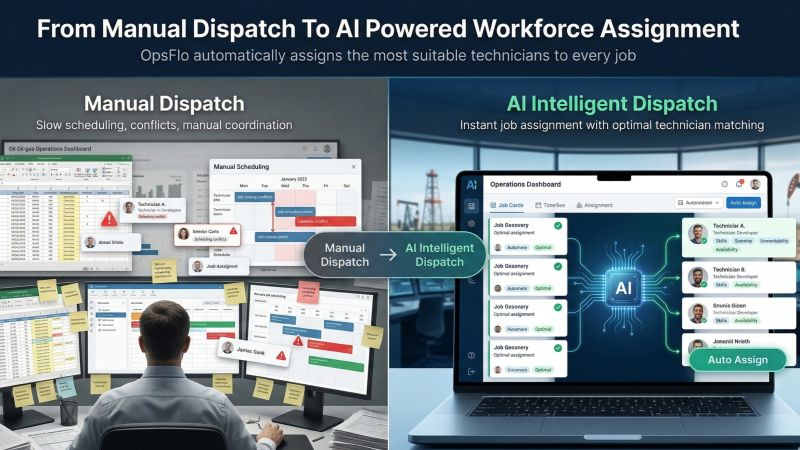
The core problem is that most inspection companies run on a patchwork of tools. They use a generic project management app for scheduling, a separate GPS app for tracking, and a paper logbook for the actual inspection data. None of these tools talk to each other. The field data is trapped in silos. The office is blind.
You need a single source of truth. You need a platform that is built for the specific chaos of oilfield inspection. You need software for pipeline inspection companies that treats the field ticket as the primary document, not an afterthought. When the field ticket is digital and structured, the reporting, the invoicing, and the compliance all become automatic.
The Real Financial Drain: Show Me the Math
Let us talk about what a bad week costs you. We are not talking about the price of the software. We are talking about the price of doing nothing. The numbers below are conservative averages from inspection firms operating in the Bakken and the Eagle Ford.
The Cost of Paper and Rekeying
Average inspector day rate: $850.00
Time spent per day on manual data entry and report building: 1.5 hours
Cost of that lost field time (or overtime): $159.00 per inspector, per day
If you have 15 inspectors in the field: $2,385.00 per day
That is $11,925.00 per week. That is $620,100.00 per year.
That is just the rekeying cost. The bigger killer is the dispute cycle. When you send a paper ticket to a major operator, they do not pay it immediately. It goes into a queue. The operator's third-party auditor checks the ticket against the PO. If the rate is wrong, or the tax code is missing, or the description is vague, they reject it.
A rejected ticket takes an average of 21 days to fix, resubmit, and get approved. Meanwhile, you have already paid the inspector. You have paid the fuel. You have paid the insurance. You are financing that operator's working capital. If you have $200,000 in outstanding receivables stuck in dispute, that is a direct hit to your cash flow.
Let us look at the DSO (Days Sales Outstanding) metric. The average oilfield service company runs a DSO of 45 to 60 days. Inspection companies with paper-based processes often run higher, around 65 days. If you can reduce that DSO by just 15 days, and you bill $2 million a month, you just freed up $1 million in cash. That is not monopoly money. That is capital you can use to buy a new vacuum truck or pay down your line of credit.
The fix is not complicated. You need to digitize the ticket at the source. You need the inspector to enter the data once, on the device in their hand, and have that data flow directly to the invoice. This is the core value proposition of descriptive anchor text that you should evaluate for your fleet.
Why Generic Solutions and Spreadsheets Fail in the Field
I have seen companies try to run inspection operations on a shared Google Sheet. It works for about two weeks. Then someone sorts the column wrong, and the depth-of-cover data for a 10-mile section gets shifted by one row. That is a catastrophic error. You could be reporting that a pipe is buried at 4 feet when it is actually at 3 feet. That is a dig-in waiting to happen.
Generic field service apps fail because they are built for HVAC technicians or cable installers. They do not understand the concept of a "spread" or a "joint number." They do not handle the complexity of a hydrostatic test procedure. They cannot manage the signature requirements for a client's specific safety permit.
You need a system that understands the difference between a "routine patrol" and a "close interval survey." You need a system that allows you to attach a photo of a failed weld cap directly to the specific GPS coordinate where that weld is located. You need a system that forces the inspector to fill in the mandatory fields before they can close out the day.
The other failure point is the lack of integration with the financial side. Most inspection companies use QuickBooks for accounting. They use a separate system for field data. At the end of the month, the office manager has to manually match the field tickets to the invoices in QuickBooks. This is where errors creep in. This is where hours are lost.
The best software for pipeline inspection companies integrates the field data directly with your billing workflow. When the job is done and the client signs off digitally, that triggers the invoice. No rekeying. No matching. No lost tickets.
Step-by-Step Operational Framework for the Modern Inspector
Here is the framework that top-performing inspection firms use to maintain a 98% first-pass acceptance rate on their invoices.
Step 1: Standardize the Data Structure
Before you send a single inspector into the field, you must define the job types. Is this a new construction weld inspection? Is this a hydrotest witness? Is this a coating inspection? Each job type has a different set of required data points. Build these templates in the software. Make them mandatory. If the inspector is doing a weld inspection, they must record the welder's stamp number, the rod type, and the amperage. If they try to submit without that data, the system should reject it.
Step 2: Equip the Field with the Right Hardware
You do not need a $2,000 ruggedized laptop. You need a decent Android tablet or an iPhone with a good camera and a GPS lock. The key is to have a device that can operate in airplane mode. Out in the Delaware Basin, cell service is spotty. Your software must allow the inspector to log data offline and sync it later. If the software cannot do that, it is useless.
Step 3: The Digital Field Ticket is the Contract
When the inspector completes the job, they generate a digital field ticket on the spot. This ticket includes the date, the location, the client PO number, the exact services performed, and the hours. The client's representative signs on the screen. This signature is the golden document. It kills the dispute before it starts.
If you are still using paper, you are fighting a war with a knife. Your competitors are using digital field ticketing to get signed off before they leave the site. You are waiting for a fax.
Step 4: Automate the Back Office Approval
The field ticket should flow automatically to the office. The office manager reviews it for accuracy, but they should not have to retype it. The system should check the rates against the contract automatically. It should flag any anomalies. Once approved, it should push directly to the invoicing queue.
This is where you see the massive time savings. Instead of spending 3 hours a day on data entry, your office manager can spend that time on collections or on scheduling the next crew. This is how you get accelerated oilfield billing.
Permian Field Case Study: The 30-Day Turnaround
Let me give you a real example from a client we worked with in the Permian. This is a mid-sized inspection company with 22 inspectors. They were doing work for a major midstream operator on a 40-mile pipeline loop in the Midland Basin.
Before they changed their process, their numbers were grim. They had a 14% ticket rejection rate. The primary reasons were missing tax IDs and incorrect unit numbers. They were spending an average of 4 hours per week just tracking down missing signatures. Their DSO was at 58 days.
We implemented a structured inspection platform. The key change was the mandatory fields and the offline capability. We also integrated the billing directly with the ticket approval.
The results after 30 days were stark. The ticket rejection rate dropped from 14% to 1.5%. That is a direct reduction in administrative rework. The office staff stopped chasing signatures because the signatures were captured in the field. The DSO dropped from 58 days to 41 days.
Let us put a dollar figure on that DSO reduction. This company billed $1.4 million per month. Reducing DSO by 17 days freed up $793,000 in working capital. That is not a trivial amount. That is the difference between making payroll and struggling.
They also eliminated the "truck roll" for missing data. Previously, if a ticket was rejected for a missing signature, an inspector had to drive back to the site to get a wet signature. That is a 2-hour round trip at $85 per hour for the truck and the inspector's time. They had 12 of those incidents per month. That is a direct saving of $2,040 per month in hard costs, plus the soft cost of the inspector being away from active work.
Implementation Checklist for Supervisors and Office Dispatch
You do not need to boil the ocean. Here is a practical checklist to get this done in two weeks.
- Week 1, Day 1: Audit your current ticket rejection reasons. Write down the top 3 reasons tickets get kicked back. It is almost always missing signature, wrong PO, or bad rate code.
- Week 1, Day 2: Define your top 5 job templates. Focus on the jobs that make up 80% of your revenue. Do not try to digitize every obscure job type on day one.
- Week 1, Day 3: Configure the mandatory fields in the software to prevent the top 3 rejection reasons.
- Week 1, Day 4: Load your client rate sheets into the system. This allows for automatic rate verification.
- Week 1, Day 5: Train your office dispatcher on the approval dashboard. They are the gatekeeper.
- Week 2, Day 1: Pilot the system with your 3 most tech-savvy inspectors. Get their feedback on the user interface.
- Week 2, Day 3: Adjust the templates based on feedback. If the inspectors say a field is redundant, remove it. If they need a dropdown for a specific client, add it.
- Week 2, Day 5: Go live with the full crew. Set a hard deadline that paper tickets will no longer be accepted after the next Monday.
Do not let the crew dictate that they "need" paper. They do not. They need a system that is faster than paper. If your software is slower than a pen, you bought the wrong software.
Frequently Asked Questions
Q: We work for multiple operators with different safety portals. Will this software conflict with their systems?
No. Your field data is yours. You will still export the specific report formats that the operator requires for their compliance portal. The difference is that you will not have to manually re-enter the data to create that report. You will generate it in one click from the approved field ticket. This saves you hours of administrative time per week.
Q: What happens when we are in a dead zone with no cell service?
The software must have a robust offline mode. Your inspector logs all the data on the tablet. The signature is captured. The photos are attached. When they drive 10 miles down the road and get a signal, the data syncs automatically. This is non-negotiable. If the software vendor tells you that you need a hotspot, walk away.
Q: How does this handle the approval from the client's company man?
The client signs the digital screen at the point of service. This is legally binding. It is the same as a wet signature. If the company man is not on site, the system allows for a "pending" status, but it flags the ticket as unapproved so your office knows to chase it immediately, not at the end of the month.
Q: We currently invoice through OpenInvoice and Cortex. Does this integrate?
Yes. The goal is to generate a clean, structured data file that matches the PIDX standards. You will export the approved tickets and upload them directly to the operator's portal. Because the data is clean and the PO numbers are verified at the field level, your acceptance rate through those portals will increase dramatically.
Clear Executive Takeaway
The inspection business is a margin business. You win jobs on price and safety record. You keep the profit by controlling your back office. The days of the clipboard and the triplicate carbon copy are over. The operators are demanding digital data. Your competitors are already delivering it.
You do not need to be a technology expert to fix this. You need to be an operations expert who demands a better tool. The tool exists. It is affordable. It pays for itself in the first month by cutting rekeying time and reducing DSO.
Stop losing money to bad data. Start by calculating your own potential savings with this ROI calculator. Then, when you are ready to see the specifics for your operation, request a revenue diagnostic and get a clear picture of where your cash is leaking.
The pipe is going in the ground. The welds are being x-rayed. The question is whether your paperwork is as solid as the steel. Make it so.
No comments yet
Be the first to share your thoughts.
Leave a Reply
Comments are disabled on the shared-hosting build. If you want to respond to this article, email info@ops-flo.com and mention "Software For Pipeline Inspection Companies That Can't Miss A Mile".
Contact OpsFlo